Official Python SDK for the Zscaler Products






Support Disclaimer
-> Disclaimer: Please refer to our General Support Statement before proceeding with the use of this provider. You can also refer to our troubleshooting guide for guidance on typical problems.
Official Zscaler Python SDK Overview
The Zscaler SDK for Python includes functionality to accelerate development via Python. This SDK can be used in your server-side code to interact with the Zscaler API platform across multiple products such as:
This SDK is designed to support the new Zscaler API framework OneAPI via a single OAuth2 HTTP client. The SDK is also backwards compatible with the previous Zscaler API framework, and each package is supported by an individual and robust HTTP client designed to handle failures on different levels by performing intelligent retries.
Release Status
This library uses semantic versioning and updates are posted in (release notes) |
Version |
Status |
|---|---|
0.x |
|
1.x |
|
The latest release can always be found on the (releases page)
Requires Python version 3.8.0 or higher. Zscaler SDK for Python is compatible with Python 3.8 (untilJune 2023), 3.8, 3.9, 3.10, and 3.11.
Need help?
If you run into problems, please refer to our General Support Statement before proceeding with the use of this SDK. You can also refer to our troubleshooting guide for guidance on typical problems. You can also raise an issue via (github issues page)
Ask questions on the Zenith Community
Post issues on GitHub (for code errors)
Support customer support portal
Getting started
To install the Zscaler Python SDK in your project:
pip install zscaler-sdk-python
Building the SDK
In most cases, you won’t need to build the SDK from source. If you want to build it yourself, you’ll need these prerequisites:
Clone the repo
Install
poetryRun
poetry buildfrom the root of the projectRun
pip install dist/zscalerdist/zscaler_sdk_python-x.x.x.tar.gz
You’ll also need
An administrator account in the Zscaler products you want to interact with.
OneAPI: If you are using the OneAPI entrypoint you must have a API Client created in the Zidentity platform
Legacy Framework: If using the legacy API framework you must have API Keys credentials in the the respective Zscaler cloud products.
For more information on getting started with Zscaler APIs visit one of the following links:
Usage guide
These examples will help you understand how to use this library.
Once you initialize a specific service client, you can call methods to make requests to the Zscaler API. Each Zscaler Service has its own package and is grouped by the API endpoint they belong to. For example, ZPA methods that call the Application Segment API are organized under [the zscaler/zpa resource (zscaler.zpa.application_segment.py)][application_segment]. The same logic applies to all other services.
NOTE: Zscaler APIs DO NOT support Asynchronous I/O calls, which made
its debut in Python 3.5 and is powered by the asyncio library and
provides avenues to produce concurrent code.
Authentication
The latest versions => 0.20.0 of this SDK provides dual API client capability and can be used to interact both with new Zscaler OneAPI framework and the legacy API platform.
If your Zscaler tenant has not been migrated to the new Zscaler Zidentity platform, you must use the respective Legacy API client described in the following section: Zscaler Legacy API Framework
Caution: Zscaler does not recommend hard-coding credentials into arguments, as they can be exposed in plain text in version control systems. Use environment variables instead.
Zscaler OneAPI New Framework
As of the publication of SDK version => 1.7.0.x, OneAPI is available for programmatic interaction with the following products:
NOTE All other products such as Zscaler Cloud Connector (ZTW) and Zscaler Digital Experience (ZDX) are supported only via the legacy authentication method described in this README.
OneAPI (API Client Scope)
OneAPI Resources are automatically created within the ZIdentity Admin UI
based on the RBAC Roles applicable to APIs within the various products.
For example, in ZIA, navigate to Administration -> Role Management
and select Add API Role.
Once this role has been saved, return to the ZIdentity Admin UI and from
the Integration menu select API Resources. Click the View icon to
the right of Zscaler APIs and under the ZIA dropdown you will see the
newly created Role. In the event a newly created role is not seen in the
ZIdentity Admin UI a Sync Now button is provided in the API
Resources menu which will initiate an on-demand sync of newly created
roles.
Default Environment Variables
You can provide credentials via the ZSCALER_CLIENT_ID,
ZSCALER_CLIENT_SECRET, ZSCALER_VANITY_DOMAIN, ZSCALER_CLOUD,
ZSCALER_PARTNER_ID environment variables, representing your Zidentity
OneAPI credentials clientId, clientSecret, vanityDomain,
cloud and partnerId respectively.
Argument |
Description |
Environment variable |
|---|---|---|
|
(String)
Zscaler API
Client ID, used
with
|
|
|
(String) A string that contains the password for the API admin. |
|
|
(String) A string Private key value. |
|
|
(String) Refers
to the domain
name used by your
organization
|
|
|
(String) The
host and basePath
for the cloud
services API is
|
|
Alternative OneAPI Cloud Environments
OneAPI supports authentication and can interact with alternative Zscaler
enviornments i.e beta, alpha etc. To authenticate to these
environments you must provide the following values:
Argument |
Description |
Environment variable |
|---|---|---|
|
(String) Refers
to the domain
name used by your
organization
|
|
|
(String) The
host and basePath
for the cloud
services API is
|
|
|
(String) The ZIA Sandbox Token |
|
|
(String) The ZIA Sandbox Cloud |
|
For example: Authenticating to Zscaler Beta environment:
export ZSCALER_VANITY_DOMAIN="acme"
export ZSCALER_CLOUD="beta"
Note 1: The attribute cloud or environment variable
ZSCALER_CLOUD is optional and only required when authenticating to
an alternative Zidentity cloud environment.
Note 2: By default this SDK will send the authentication request and subsequent API calls to the default base URL.
Note 3: Authentication to Zscaler Sandbox requires the attribute/parameter sandboxCloud.The following cloud environments are supported:
zscaler
zscalerone
zscalertwo
zscalerthree
zscloud
zscalerbeta
zscalergov
zscalerten
zspreview
Authenticating to Zscaler Private Access (ZPA)
The authentication to Zscaler Private Access (ZPA) via the OneAPI
framework, requires the extra attribute called customerId and
optionally the attributes microtenantId and partnerId.
Argument |
Description |
Environment variable |
|---|---|---|
|
(String)
Zscaler API
Client ID, used
with
|
|
|
(String) A string that contains the password for the API admin. |
|
|
(String) A string Private key value. |
|
|
(String) The ZPA tenant ID found under Configuration & Control > Public API > API Keys menu in the ZPA console. |
|
|
(String) The ZPA microtenant ID found in the respective microtenant instance under Configuration & Control > Public API > API Keys menu in the ZPA console. |
|
|
(String) Refers
to the domain
name used by your
organization
|
|
|
Initialize OneAPI OAuth 2.0 Client
OneAPI Client ID and Client Secret Authentication
Construct a client instance by passing your Zidentity clientId,
clientSecret and vanityDomain:
from zscaler import ZscalerClient

config = {
    "clientId": '{yourClientId}',
    "clientSecret": '{yourClientSecret}',
    "vanityDomain": '{yourvanityDomain}',
    "cloud": "beta", # Optional when authenticating to an alternative cloud environment
    "customerId": "", # Optional parameter. Required only when using ZPA
    "microtenantId": "", # Optional parameter. Required only when using ZPA with Microtenant
    "partnerId": "", # Optional parameter. When provided, automatically includes x-partner-id header in all requests
    "logging": {"enabled": False, "verbose": False},
}

def main():
    with ZscalerClient(config) as client:
        idp_id = "72058304855015574"
        query_params = {'page': '1', 'page_size': '100'}
        groups, resp, err = client.zpa.scim_groups.list_scim_groups(idp_id=idp_id, query_params=query_params)
        if err:
            print(f"Error listing SCIM groups: {err}")
            return
        if groups:
            print(f"Processing {len(groups)} groups:")
            for group in groups:
                print(group)

        try:
            resp.next()
        except StopIteration:
            print("No more groups to retrieve.")

if __name__ == "__main__":
    main()
OneAPI Client ID and Private Key Authentication
from zscaler import ZscalerClient

config = {
    "clientId": '{yourClientId}',
    "privateKey": '{yourPrivateKey}',
    "vanityDomain": '{yourvanityDomain}',
    "cloud": "beta", # Optional when authenticating to an alternative cloud environment
    "customerId": "", # Optional parameter. Required only when using ZPA
    "microtenantId": "", # Optional parameter. Required only when using ZPA with Microtenant
    "partnerId": "", # Optional parameter. When provided, automatically includes x-partner-id header in all requests
    "logging": {"enabled": False, "verbose": False},
}

def main():
    with ZscalerClient(config) as client:
        idp_id = "72058304855015574"
        query_params = {'page': '1', 'page_size': '100'}
        groups, resp, err = client.zpa.scim_groups.list_scim_groups(idp_id=idp_id, query_params=query_params)
        if err:
            print(f"Error listing SCIM groups: {err}")
            return
        if groups:
            print(f"Processing {len(groups)} groups:")
            for group in groups:
                print(group)

        try:
            resp.next()
        except StopIteration:
            print("No more groups to retrieve.")

if __name__ == "__main__":
    main()
Note, that privateKey can be passed in JWK format or in PEM format,
i.e. (examples generated with https://mkjwk.org):
Using a Python dictionary to hard-code the Zscaler API credentials is encouraged for development ONLY; In production, you should use a more secure way of storing these values. This library supports a few different configuration sources, covered in the configuration reference section.
NOTE: THIS IS NOT A PRODUCTION KEY AND IS DISPLAYED FOR EXAMPLE PURPOSES ONLY
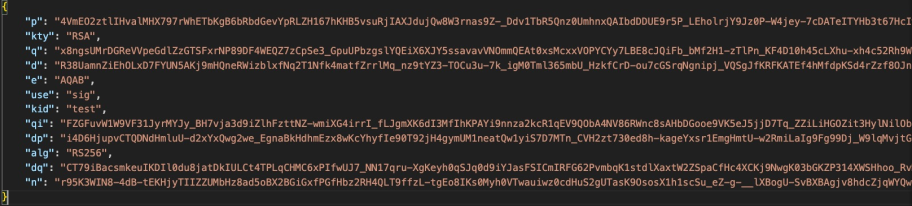
JWK Example
or
NOTE: THIS IS NOT A PRODUCTION KEY AND IS DISPLAYED FOR EXAMPLE PURPOSES ONLY
-----BEGIN PRIVATE KEY-----
# Example private key (not a real key)
MIIEvQIBADANBgkqhkiG9w0BAQEFAASCBKcwggSjAgEAAoIBAQCv3krdYg3z7h0H
60QoePJMghllQxsfPxp3mgFfYEaIbF88Z8dvPZEfhAtP19/Mv62ASjwgqzQzKHRV
-----END PRIVATE KEY-----
Get and set custom headers
It is possible to set custom headers, which will be sent with each
request. This feature is only supported when instantiating the OneAPI
Client ZscalerClient.
from zscaler import ZscalerClient

def main():
    with ZscalerClient(config) as client:
        client.set_custom_headers({'Custom-Header': 'custom value'})
        groups, resp, err = client.zpa.segment_groups.list_groups()
        for group in groups:
            print(group.name, group.description)

    # clear all custom headers
    client.clear_custom_headers()

    # output should be: {}
    print(client.get_custom_headers())
Note, that custom headers will be overwritten with default headers with the same name. This doesn’t allow breaking the client. Get default headers:
Automatic x-partner-id Header Injection
The SDK automatically includes the x-partner-id header in all API
requests when partnerId is provided in the configuration. This
feature works seamlessly across all services (ZIA, ZPA, ZTW, ZCC, ZDX,
ZWA) and both OneAPI and Legacy clients.
How it works:
When
partnerIdis provided via config dictionary orZSCALER_PARTNER_IDenvironment variable, the SDK automatically addsx-partner-id: <partnerId>to all request headersIf
partnerIdis not provided, the header is not includedNo additional code is required - the header injection is handled automatically by the SDK
Example:
from zscaler import ZscalerClient

config = {
    "clientId": '{yourClientId}',
    "clientSecret": '{yourClientSecret}',
    "vanityDomain": '{yourvanityDomain}',
    "partnerId": "542585sdsdw", # Automatically adds x-partner-id header to all requests
    "logging": {"enabled": False, "verbose": False},
}

def main():
    with ZscalerClient(config) as client:
        # All API requests will automatically include: x-partner-id: 542585sdsdw
        groups, resp, err = client.zpa.segment_groups.list_groups()
        # ... rest of your code
Note: This feature is also supported in Legacy clients. When using
LegacyZPAClient, LegacyZIAClient, etc., you can provide
partnerId in the config dictionary and the header will be
automatically included in all requests.
ZIA and ZTW Context Manager
The Zscaler SDK provides a context manager pattern that automatically handles authentication and session cleanup for both ZIA and ZTW services. This pattern ensures that all configuration changes are properly activated when the context manager exits.
How Context Manager Works
When you use the with statement with a Zscaler client, the following happens automatically:
Authentication: The client authenticates when entering the context
Session Management: A session is established and maintained throughout the context
Automatic Deauthentication: When exiting the context, the client automatically deauthenticates, which activates all staged configuration changes
Implicit Activation Process
The context manager implements an “implicit activation” approach where:
All changes are final: Configuration changes are automatically activated when the context exits
No manual activation required: You don’t need to remember to call activation endpoints
Deterministic behavior: You always know that exiting the context will activate changes
Automation-friendly: Perfect for scripts and automation scenarios
Example Usage
from zscaler import ZscalerClient

config = {
    "clientId": '{yourClientId}',
    "clientSecret": '{yourClientSecret}',
    "vanityDomain": '{yourvanityDomain}',
    "cloud": "beta", # Optional when authenticating to an alternative cloud environment
    "customerId": "", # Optional parameter. Required only when using ZPA
    "microtenantId": "", # Optional parameter. Required only when using ZPA with Microtenant
    "partnerId": "", # Optional parameter. When provided, automatically includes x-partner-id header in all requests
    "logging": {"enabled": False, "verbose": False},
}

def main():
    with ZscalerClient(config) as client:
        # Make ZIA configuration changes
        added_role, response, error = client.zia.admin_roles.add_role(
            name="New API Role",
            description="Role created via API",
            feature_permissions={"ZIA_ADMIN_ROLE": "READ"}
        )
        if error:
            print(f"Error adding role: {error}")
            return

        # Make ZTW configuration changes
        added_group, response, error = client.ztw.ip_destination_groups.add_group(
            name="New IP Group",
            description="IP group created via API"
        )
        if error:
            print(f"Error adding IP group: {error}")
            return

        print("All changes made successfully")

    # Context manager automatically deauthenticates here
    # All staged changes are activated automatically for both ZIA and ZTW
    print("Context exited - all changes have been activated")

if __name__ == "__main__":
    main()
Benefits
Automatic cleanup: No need to manually deauthenticate
Error handling: Even if an exception occurs, the context manager ensures proper cleanup
Staged configuration activation: All changes are activated when the context exits
Simplified code: No need to remember activation steps
Multi-service support: Works seamlessly with both ZIA and ZTW services
Zscaler OneAPI Rate Limiting
Zscaler OneAPI provides unique rate limiting numbers for each individual product. Regardless of the product, a 429 response will be returned if too many requests are made within a given time.
Built-In Retry
This SDK uses a built-in retry strategy to automatically retry on 429 errors based on the response headers returned by each respective API service.
The header x-ratelimit-reset is returned in the API response for
each API call, which indicates the time in seconds until the rate limit
resets. The SDK uses the returned value in this header to calculate the
retry time for the following services:
ZCC Rate Limiting for rate limiting requirements.
ZIA Rate Limiting for rate limiting requirements.
ZPA Rate Limiting for rate limiting requirements.
Pagination
The pagination system in this SDK is unified across ZCC, ZTW, ZDX, ZIA, ZPA, ZWA and is applied transparently whether you’re using the Legacy API Client or the new OneAPI OAuth2 Client. Filter or search for Segment Groups
✅ This means no code changes are needed when transitioning from the legacy API framework to OneAPI framework.
When calling a method that supports pagination (e.g., list_users, list_groups, list_app_segments), only the first page of results is returned initially. The SDK returns a response tuple:
items, response, error = client.zia.user_management.list_groups()
You can then use the response.has_next() and response.next() methods to retrieve subsequent pages.
Basic Pagination Example
query_parameters = {'page_size': 100}
groups, resp, err = client.zia.user_management.list_groups(query_parameters)

while resp.has_next():
   more_groups, err = resp.next()
   if err:
      break
   groups.extend(more_groups)
Searching and Filtering
You can filter or search using available query parameters. The available parameters vary by service, so refer to each method’s documentation for details.
# Query parameters are optional on methods that can use them!
# Check the method definition for details on which query parameters are accepted.
query_parameters = {'page': '1', 'page_size': '100'}
groups, resp, err = client.zpa.segment_groups.list_groups(query_parameters)
# Query parameters are optional on methods that can use them!
# Check the method definition for details on which query parameters are accepted.
# Using the search parameter to support search by features and fields.
query_parameters = {'search': 'Group1'}
groups, resp, err = client.zpa.segment_groups.list_groups(query_parameters)
Full Example with Error Handling
def main():
   with ZscalerClient(config) as client:
      query_parameters = {}
      groups, resp, err = client.zia.user_management.list_groups(query_parameters)

      if err:
            print(f"Error: {err}")
            return

      print(f"Processing {len(groups)} groups:")
      for group in groups:
            print(group)

      while resp.has_next():
            next_page, err = resp.next()
            if err:
               print(f"Error fetching next page: {err}")
               break
            for group in next_page:
               print(group)

      try:
            resp.next()  # Will raise StopIteration if no more data
      except StopIteration:
            print("✅ No more groups to retrieve.")

if __name__ == "__main__":
   main()
Pagination Limits and Controls
Each Zscaler service has its own pagination requiremens and max page size:
Service Notes |
Default Page Size |
Max Page Size |
Notes |
|---|---|---|---|
|
|
|
Uses |
|
|
|
Uses |
|
|
|
|
|
|
|
Uses |
|
|
|
Uses |
|
|
|
Uses |
⚠️ Note: Always use snake_case for all parameter names, even when the API expects camelCase.The SDK handles conversion internally.
Internal Pagination Handling
The ZscalerAPIResponse object returned as resp handles:
Tracking the current page
Automatically applying proper pagination parameters per service
Mapping pagination fields like page, pagesize, limit, offset, next_offset, etc.
Fallback handling when the API doesn’t indicate the total count
You don’t need to worry about API quirks—just use resp.has_next() and resp.next() safely.
⚠️ Note on StopIteration The SDK raises a StopIteration if next() is called and no more pages are available:
try:
   resp.next()
except StopIteration:
   print("All data fetched.")
Logging
The Zscaler SDK Python, provides robust logging for debug purposes. Logs are disabled by default and should be enabled explicitly via client configuration or via a configuration file:
from zscaler import ZscalerClient

config = {"logging": {"enabled": True}}
client = ZscalerClient(config)
You can also enable debug logging via the following environment
variables: * ZSCALER_SDK_LOG - Turn on logging *
ZSCALER_SDK_VERBOSE - Turn on logging in verbose mode
export ZSCALER_SDK_LOG=true
export ZSCALER_SDK_VERBOSE=true
This SDK utilizes the standard Python library logging. By default,
log level INFO is set. You can set another log level by setting the
argument verbose to True.
NOTE: DO NOT SET DEBUG LEVEL IN PRODUCTION!
from zscaler import ZscalerClient

config = {
    "clientId": '{yourClientId}',
    "clientSecret": '{yourClientSecret}',
    "vanityDomain": '{yourvanityDomain}',
    "cloud": "beta", # Optional when authenticating to an alternative cloud environment
    "customerId": "", # Optional parameter. Required only when using ZPA
    "microtenantId": "", # Optional parameter. Required only when using ZPA with Microtenant
    "logging": {"enabled": True, "verbose": True},
}

def main():
    with ZscalerClient(config) as client:
        groups, resp, err = client.zpa.segment_groups.list_groups()
        for group in groups:
            print(group.name, group.description)
if __name__ == "__main__":
    main()
You should now see logs in your console. Notice that API Credentials i.e
clientId and clientSecret are NOT logged to the console;
however, Bearer tokens are still visible. We still advise to use caution
and never use verbose level logging in production.
What it being logged? requests, responses, http errors,
caching responses.
Configuration reference
This library looks for configuration in the following sources:
An
zscaler.yamlfile in a.zscalerfolder in the current user’s home directory (~/.zscaler/zscaler.yamlor%userprofile%\.zscaler\zscaler.yaml). See a sample YAML ConfigurationA
zscaler.yamlfile in the application or project’s root directory. See a sample YAML ConfigurationConfiguration explicitly passed to the constructor (see the example in Getting started)
Only ONE source needs to be provided!
Higher numbers win. In other words, configuration passed via the
constructor will OVERRIDE configuration found in environment variables,
which will override configuration in the designated zscaler.yaml
files.
NOTE: This option is only supported for OneAPI Zidentity credentials at the moment.
YAML configuration
When you use an API Token instead of OAuth 2.0 the full YAML configuration looks like:
zscaler:
  client:
    clientId: { yourClientId }
    clientSecret: { yourClientSecret }
    proxy:
      port: { proxy_port }
      host: { proxy_host }
      username: { proxy_username }
      password: { proxy_password }
    logging:
      enabled: true
      verbose: true
NOTE: THIS IS NOT A PRODUCTION KEY AND IS DISPLAYED FOR EXAMPLE PURPOSES ONLY
When you use OAuth 2.0 the full YAML configuration looks like:
zscaler:
  client:
    clientId: "YOUR_CLIENT_ID"
    privateKey: |
      -----BEGIN RSA PRIVATE KEY-----
      MIIEogIBAAKCAQEAl4F5CrP6Wu2kKwH1Z+CNBdo0iteHhVRIXeHdeoqIB1iXvuv4
      THQdM5PIlot6XmeV1KUKuzw2ewDeb5zcasA4QHPcSVh2+KzbttPQ+RUXCUAr5t+r
      0r6gBc5Dy1IPjCFsqsPJXFwqe3RzUb...
      -----END RSA PRIVATE KEY-----
    proxy:
      port: { proxy_port }
      host: { proxy_host }
      username: { proxy_username }
      password: { proxy_password }
    logging:
      enabled: true
      verbose: true
Environment variables
Each one of the configuration values above can be turned into an
environment variable name with the _ (underscore) character and
UPPERCASE characters. The following are accepted:
Argument |
Description |
Environment variable |
|---|---|---|
|
(String)
Zscaler API
Client ID, used
with
|
|
|
(String) A string that contains the password for the API admin. |
|
|
(String) A string Private key value. |
|
|
(String) Refers
to the domain
name used by your
organization
|
|
|
(String) The
host and basePath
for the cloud
services API is
|
|
|
(String) Append additional information to the HTTP User-Agent |
`` ZSCALER_CLIENT_USERAGENT`` |
|
(String) Use request memory cache |
|
`` cache.defaultTti`` |
(String) Cache clean up interval in seconds |
|
`` cache.defaultTtl`` |
(String) Cache time to live in seconds |
|
|
(String) HTTP proxy port |
|
|
(String) HTTP proxy host |
|
|
(String) HTTP proxy username |
|
|
(String) HTTP proxy password |
|
|
(String) Disable SSL checks |
|
Zscaler ZIdentity API
This SDK supports programmatic integration with the Zscaler ZIdentity API service.
The authentication to Zscaler ZIdentity service via the OneAPI framework, requires uses the API client ZscalerClient
Argument |
Description |
Environment variable |
|---|---|---|
|
(String)
Zscaler API
Client ID, used
with
|
|
|
(String) A string that contains the password for the API admin. |
|
|
(String) A string Private key value. |
|
|
(String) Refers
to the domain
name used by your
organization
|
|
|
(String) The
host and basePath
for the cloud
services API is
|
|
Initialize OneAPI OAuth 2.0 Client
Zidentity OneAPI Client ID and Client Secret Authentication
Construct a client instance by passing your Zidentity clientId, clientSecret and vanityDomain:
from zscaler import ZscalerClient

config = {
   "clientId": '{yourClientId}',
   "clientSecret": '{yourClientSecret}',
   "vanityDomain": '{yourvanityDomain}',
   "cloud": "beta", # Optional when authenticating to an alternative cloud environment
   "logging": {"enabled": False, "verbose": False},
}

def main():
   with ZscalerClient(config) as client:
      users, _, error = client.zidentity.groups.list_groups()
      if error:
            print(f"Error listing users: {error}")
            return

      print(f"Total users found: {len(users)}")

if __name__ == "__main__":
   main()
Zidentity OneAPI Client ID and Private Key Authentication
from zscaler import ZscalerClient

config = {
   "clientId": '{yourClientId}',
   "privateKey": '{yourPrivateKey}',
   "vanityDomain": '{yourvanityDomain}',
   "cloud": "beta", # Optional when authenticating to an alternative cloud environment
   "logging": {"enabled": False, "verbose": False},
}

def main():
   with ZscalerClient(config) as client:
      users, _, error = client.zidentity.groups.list_groups()
      if error:
            print(f"Error listing users: {error}")
            return

      print(f"Total users found: {len(users)}")

if __name__ == "__main__":
   main()
Zscaler Sandbox Authentication
To authenticate to the Zscaler Sandbox service you must authenticate by instantiating the ZscalerClient.
Authentication to Zscaler Sandbox requires the attribute/parameter sandboxCloud. The following cloud environments are supported:
zscaler
zscalerone
zscalertwo
zscalerthree
zscloud
zscalerbeta
zscalergov
zscalerten
zspreview
Environment variables
You can provide credentials via the ZSCALER_SANDBOX_TOKEN, ZSCALER_SANDBOX_CLOUD environment variables, representing your Zscaler Sandbox authentication paraemters respectively sandboxToken, sandboxCloud
Argument |
Description |
Environment variable |
|---|---|---|
|
(String) The ZIA Sandbox Token |
|
|
(String) The ZIA Sandbox Cloud |
|
Zscaler Sandbox Client Initialization
from zscaler import ZscalerClient

config = {
   "sandboxToken": '{yourSandboxToken}',
   "sandboxCloud": '{yourSandboxCloud}',
   "logging": {"enabled": False, "verbose": False},
}

def main():

   script_dir = os.path.dirname(os.path.abspath(__file__))
   file_path = os.path.join(script_dir, "test-pe-file.exe")
   force_analysis = True

   with ZscalerClient(config) as client:
      submit, _, err = client.zia.sandbox.submit_file(file_path=file_path, force=force_analysis)

      if err:
            print(f"Error submitting file: {err}")
      else:
            print("File submitted successfully!")
            print(f"Response: {submit}")

if __name__ == "__main__":
   main()
Zscaler Legacy API Framework
The legacy Zscaler API is still utilized by several customers, and will remain in place for the foreable future with no specific annouced deprecation date.
ZIA Legacy Authentication
Organizations whose tenant is still not migrated to Zidentity must
continue using their previous ZIA API credentials. This SDK provides a
dedicated API client LegacyZIAClient compatible with the legacy
framework, which must be used in this scenario.
For authentication via Zscaler Internet Access, you must provide
username,password,api_keyandcloud
The ZIA Cloud is identified by several cloud name prefixes, which determines which API endpoint the requests should be sent to. The following cloud environments are supported:
zscalerzscaleronezscalertwozscalerthreezscloudzscalerbetazscalergovzscalertenzspreview
Environment variables
You can provide credentials via the ZIA_USERNAME, ZIA_PASSWORD,
ZIA_API_KEY, ZIA_CLOUD environment variables, representing your
ZIA username, password, api_key and cloud respectively.
Argument |
Description |
Environment variable |
|---|---|---|
|
(String) A string that contains the email ID of the API admin. |
|
|
(String) A string that contains the password for the API admin. |
|
|
(String) A string that contains the obfuscated API key (i.e., the return value of the obfuscateApiKey() method). |
|
|
(String) The
host and basePath
for the cloud
services API is
|
|
ZIA Legacy Client Initialization
import random
from zscaler.oneapi_client import LegacyZIAClient

config = {
    "username": '{yourUsername}',
    "password": '{yourPassword}',
    "api_key": '{yourApiKey}',
    "cloud": '{yourCloud}',
    "logging": {"enabled": False, "verbose": False},
}

def main():
    with LegacyZIAClient(config) as client:
        added_label, response, error = client.zia.rule_labels.add_label(
            name=f"NewLabel_{random.randint(1000, 10000)}",
            description=f"NewLabel_{random.randint(1000, 10000)}",
        )
        if err:
            print(f"Error adding label: {err}")
            return
        print(f"Label added successfully: {added_label.as_dict()}")

if __name__ == "__main__":
    main()
ZIA and ZTW Context Manager
The Zscaler SDK provides a context manager pattern that automatically handles authentication and session cleanup for both ZIA and ZTW services. This pattern ensures that all configuration changes are properly activated when the context manager exits.
How Context Manager Works
When you use the with statement with a Zscaler client, the following happens automatically:
Authentication: The client authenticates when entering the context
Session Management: A session is established and maintained throughout the context
Automatic Deauthentication: When exiting the context, the client automatically deauthenticates, which activates all staged configuration changes
Implicit Activation Process
The context manager implements an “implicit activation” approach where:
All changes are final: Configuration changes are automatically activated when the context exits
No manual activation required: You don’t need to remember to call activation endpoints
Deterministic behavior: You always know that exiting the context will activate changes
Automation-friendly: Perfect for scripts and automation scenarios
Example Usage
import random
from zscaler.oneapi_client import LegacyZIAClient

config = {
    "username": '{yourUsername}',
    "password": '{yourPassword}',
    "api_key": '{yourApiKey}',
    "cloud": '{yourCloud}',
    "logging": {"enabled": False, "verbose": False},
}

def main():
    with LegacyZIAClient(config) as client:
        # Make configuration changes
        added_label, response, error = client.zia.rule_labels.add_label(
            name=f"NewLabel_{random.randint(1000, 10000)}",
            description=f"NewLabel_{random.randint(1000, 10000)}",
        )
        if error:
            print(f"Error adding label: {error}")
            return

        # Make more changes
        updated_role, response, error = client.zia.admin_roles.update_role(
            role_id="12345",
            name="Updated Role Name"
        )
        if error:
            print(f"Error updating role: {error}")
            return

        print("All changes made successfully")

    # Context manager automatically deauthenticates here
    # All staged changes are activated automatically
    print("Context exited - all changes have been activated")

if __name__ == "__main__":
    main()
Benefits
Automatic cleanup: No need to manually deauthenticate
Error handling: Even if an exception occurs, the context manager ensures proper cleanup
Staged configuration activation: All changes are activated when the context exits
Simplified code: No need to remember activation steps
ZTW Legacy Authentication
Organizations whose tenant is still not migrated to Zidentity must
continue using their previous ZTW API credentials. This SDK provides a
dedicated API client LegacyZTWClient compatible with the legacy
framework, which must be used in this scenario.
For authentication via Zscaler Internet Access, you must provide
username,password,api_keyandcloud
The ZTW Cloud is identified by several cloud name prefixes, which determines which API endpoint the requests should be sent to. The following cloud environments are supported:
zscalerzscaleronezscalertwozscalerthreezscloudzscalerbetazscalergovzscalertenzspreview
Environment variables
You can provide credentials via the ZTW_USERNAME,
ZTW_PASSWORD, ZTW_API_KEY, ZTW_CLOUD environment
variables, representing your ZTW username, password,
api_key and cloud respectively.
Argument |
Description |
Environment variable |
|---|---|---|
|
(String) A string that contains the email ID of the API admin. |
|
|
(String) A string that contains the password for the API admin. |
|
|
(String) A string that contains the obfuscated API key (i.e., the return value of the obfuscateApiKey() method). |
|
|
(String) The
host and basePath
for the cloud
services API is
|
|
ZTW Legacy Client Initialization
import random
from zscaler.oneapi_client import LegacyZTWClient

config = {
    "username": '{yourUsername}',
    "password": '{yourPassword}',
    "api_key": '{yourApiKey}',
    "cloud": '{yourCloud}',
    "logging": {"enabled": False, "verbose": False},
}

def main():
    with LegacyZTWClient(config) as client:
        fetched_prov_url, response, error = client.ztw.provisioning_url.list_provisioning_url()
        if error:
            print(f"Error fetching prov url by ID: {error}")
            return
        print(f"Fetched prov url by ID: {fetched_prov_url.as_dict()}")

if __name__ == "__main__":
    main()
ZPA Legacy Authentication
Organizations whose tenant is still not migrated to Zidentity must
continue using their previous ZPA API credentials. This SDK provides a
dedicated API client LegacyZPAClient compatible with the legacy
framework, which must be used in this scenario.
For authentication via Zscaler Private Access, you must provide
client_id,client_secret,customer_idandcloud
The ZPA Cloud is identified by several cloud name prefixes, which determines which API endpoint the requests should be sent to. The following cloud environments are supported:
PRODUCTIONZPATWOBETAGOVGOVUS
Environment variables
You can provide credentials via the ZPA_CLIENT_ID,
ZPA_CLIENT_SECRET, ZPA_CUSTOMER_ID, ZPA_CLOUD environment
variables, representing your ZPA clientId, clientSecret,
customerId and cloud of your ZPA account, respectively.
~> NOTE ZPA_CLOUD environment variable is required, and is used
to identify the correct API gateway where the API requests should be
forwarded to.
Argument |
Description |
Environment variable |
|---|---|---|
|
(String) The ZPA API client ID generated from the ZPA console. |
|
|
(String) The ZPA API client secret generated from the ZPA console. |
|
|
(String) The ZPA tenant ID found in the Administration > Company menu in the ZPA console. |
|
|
(String) The ZPA microtenant ID found in the respective microtenant instance under Configuration & Control > Public API > API Keys menu in the ZPA console. |
|
|
(String) The Zscaler cloud for your tenancy. |
|
ZPA Legacy Client Initialization
import random
from zscaler.oneapi_client import LegacyZPAClient

config = {
    "clientId": '{yourClientId}',
    "clientSecret": '{yourClientSecret}',
    "customerId": '{yourCustomerId}',
    "microtenantId": '{yourMicrotenantId}',
    "cloud": '{yourCloud}',
    "logging": {"enabled": False, "verbose": False},
}

def main():
    with LegacyZPAClient(config) as client:
        added_label, response, error = client.zpa.segment_groups.add_group(
            name=f"NewGroup_{random.randint(1000, 10000)}",
            description=f"NewGroup_{random.randint(1000, 10000)}",
            enabled=True
        )
        if err:
            print(f"Error adding segment group: {err}")
            return
        print(f"Segment Group added successfully: {added_label.as_dict()}")

if __name__ == "__main__":
    main()
ZCC Legacy Authentication
Organizations whose tenant is still not migrated to Zidentity must
continue using their previous ZCC API credentials. This SDK provides a
dedicated API client LegacyZCCClient compatible with the legacy
framework, which must be used in this scenario.
For authentication via Zscaler Client Connector (ZCC), you must provide
api_key,secret_key, andcloud
The ZCC Cloud is identified by several cloud name prefixes, which determines which API endpoint the requests should be sent to. The following cloud environments are supported:
zscalerzscaleronezscalertwozscalerthreezscloudzscalerbetazscalergovzscalertenzspreview
Environment variables
You can provide credentials via the ZCC_CLIENT_ID,
ZCC_CLIENT_ID, ZCC_CLOUD environment variables, representing
your ZIA api_key, secret_key, and cloud respectively.
~> NOTE ZCC_CLOUD environment variable is required, and is used
to identify the correct API gateway where the API requests should be
forwarded to.
Argument |
Description |
Environment variable |
|---|---|---|
|
(String) A string that contains the apiKey for the Mobile Portal. |
|
|
(String) A string that contains the secret key for the Mobile Portal. |
|
|
(String) The
host and basePath
for the ZCC cloud
services API is
|
|
ZCC Legacy Client Initialization
import random
from zscaler.oneapi_client import LegacyZCCClient

config = {
    "api_key": '{yourApiKey}',
    "secret_key": '{yourSecreKey}',
    "cloud": '{yourCloud}',
    "logging": {"enabled": False, "verbose": False},
}

    with LegacyZCCClient(config) as client:

        for group in client.zcc.devices.list_devices():
            print(group)
if __name__ == "__main__":
    main()
ZDX Legacy Authentication
This SDK provides a dedicated API client LegacyZDXClient compatible
with the legacy framework, which must be used in this scenario.
For authentication via Zscaler Digital Experience (ZDX), you must provide
key_id,key_secret
The ZDX cloud attribute identifies the cloud name prefix, which
determines which API endpoint the requests should be sent to. By default
the ZDX API client will always send the request to the following cloud:
zdxcloud
zdxcloudzdxbeta
ZDX Environment variables
You can provide credentials via the ZDX_CLIENT_ID,
ZDX_CLIENT_SECRET environment variables, representing your ZDX
key_id, key_secret of your ZDX account, respectively.
Argument |
Description |
Environment variable |
|---|---|---|
|
(String) A string that contains the key_id for the ZDX Portal. |
|
|
(String) A string that contains the key_secret key for the ZDX Portal. |
|
|
(String) The cloud name prefix that identifies the correct API endpoint. |
|
ZDX Legacy Client Initialization
import random
from zscaler.oneapi_client import LegacyZDXClient

config = {
    "key_id": '{yourKeyId}',
    "key_secret": '{yourKeySecret}',
    "cloud": '{yourCloud}',
    "logging": {"enabled": False, "verbose": False},
}

def main():
    with LegacyZDXClient(config) as client:
        app_list, _, err = client.zdx.apps.list_apps(query_params{"since": 2})
        if err:
            print(f"Error listing applications: {err}")
            return
        for app in app_list:
            print(app.as_dict())

if __name__ == "__main__":
    main()
ZWA Legacy Authentication
This SDK provides a dedicated API client LegacyZWAClient compatible
with the legacy framework, which must be used in this scenario.
For authentication via Zscaler Workflow Automation (ZWA), you must provide
key_id,key_secret
The ZWA cloud attribute identifies the cloud name prefix, which
determines which API endpoint the requests should be sent to. By default
the ZDX API client will always send the request to the following cloud:
us1
us1
For authentication via Zscaler Workflow Automation (ZWA), you must
provide key_id, key_secret
ZWA Environment variables
You can provide credentials via the ZWA_CLIENT_ID,
ZWA_CLIENT_SECRET environment variables, representing your ZDX
key_id, key_secret of your ZWA account, respectively.
Argument |
Description |
Environment variable |
|---|---|---|
|
(String) The ZWA string that contains the API key ID. |
|
|
(String) The ZWA string that contains the key secret. |
|
|
(String) The ZWA string containing cloud provisioned for your organization. |
|
ZWA Legacy Client Initialization
import random
from zscaler.oneapi_client import LegacyZWAClient

config = {
    "key_id": '{yourKeyId}',
    "key_secret": '{yourKeySecret}',
    "cloud": '{yourCloud}',
    "logging": {"enabled": False, "verbose": False},
}

def main():
    with LegacyZWAClient(config) as client:
        transactions, _, err = client.zwa.dlp_incidents.get_incident_transactions('SVDP-17410643229970491392')
        if err:
            print(f"Error listing transactions: {err}")
            return
        for incident in transactions:
            print(incident.as_dict())

if __name__ == "__main__":
    main()
Zscaler Legacy API Rate Limiting
Zscaler provides unique rate limiting numbers for each individual product. Regardless of the product, a 429 response will be returned if too many requests are made within a given time. Please see:
The header X-Rate-Limit-Remaining is returned in the API response
for each API call. This header indicates the time in seconds until the
rate limit resets. The SDK uses the returned value to calculate the
retry time for the following services: * ZCC Rate
Limiting
for rate limiting requirements.
The header RateLimit-Reset is returned in the API response for each
API call. This header indicates the time in seconds until the rate limit
resets. The SDK uses the returned value to calculate the retry time for
the following services: * ZDX Rate
Limiting
for rate limiting requirements. * ZWA Rate
Limiting
for rate limiting requirements.
When a 429 error is received, the Retry-After header is returned in
the API response. The SDK uses the returned value to calculate the retry
time. The following services are rate limited based on its respective
endpoint. * ZTW Rate
Limiting
for a complete list of which endpoints are rate limited. * ZIA Rate
Limiting
for a complete list of which endpoints are rate limited.
When a 429 error is received, the retry-after header will tell you
the time at which you can retry. The SDK uses the returned value to
calculate the retry time. * ZPA Rate
Limiting
for rate limiting requirements.
Built-In Retry
This SDK uses the built-in retry strategy to automatically retry on 429 errors based on the response headers returned by each respective API service.
Contributing
At this moment we are not accepting contributions, but we welcome suggestions on how to improve this SDK or feature requests, which can then be added in future releases.
Contributors
MIT License
Copyright (c) 2023 Zscaler
Permission is hereby granted, free of charge, to any person obtaining a copy of this software and associated documentation files (the “Software”), to deal in the Software without restriction, including without limitation the rights to use, copy, modify, merge, publish, distribute, sublicense, and/or sell copies of the Software, and to permit persons to whom the Software is furnished to do so, subject to the following conditions:
The above copyright notice and this permission notice shall be included in all copies or substantial portions of the Software.
THE SOFTWARE IS PROVIDED “AS IS”, WITHOUT WARRANTY OF ANY KIND, EXPRESS OR IMPLIED, INCLUDING BUT NOT LIMITED TO THE WARRANTIES OF MERCHANTABILITY, FITNESS FOR A PARTICULAR PURPOSE AND NONINFRINGEMENT. IN NO EVENT SHALL THE AUTHORS OR COPYRIGHT HOLDERS BE LIABLE FOR ANY CLAIM, DAMAGES OR OTHER LIABILITY, WHETHER IN AN ACTION OF CONTRACT, TORT OR OTHERWISE, ARISING FROM, OUT OF OR IN CONNECTION WITH THE SOFTWARE OR THE USE OR OTHER DEALINGS IN THE SOFTWARE.